

Claude prompt caching 教學:長對話省錢的關鍵
把長 system prompt、tool schema、文件部分快取起來——首次寫入貴 1.25 倍,命中讀取只要 0.1 倍。長對話省錢的關鍵手法。
TL;DR
- Cache 寫入比正常 input 貴一點點(1.25×)、命中讀取便宜十倍(0.1×),算盤要打對才會賺
- 用
cache_control: {"type": "ephemeral"}標記 break point,最多 4 個;只快取「break point 以前」的內容 - TTL 預設 5 分鐘、可延長到 1 小時;最小可快取單位約 1024 tokens(Sonnet/Opus),太短不會被快取
一個情境:對同一份 100 頁 PDF 反覆問問題
你做了一個內部工具,user 上傳一份 100 頁的合約 PDF,然後一直問「這份合約的違約金條款?」「保密期限多長?」「有沒有自動續約?」⋯⋯
每問一題,你都要把 整份 PDF + system prompt + 對話歷史 重傳一次。100 頁 PDF 約 30K input tokens——問 10 題就燒 300K input tokens,每次還得等 Claude 重新做一遍 tokenize、embed、attention 那一整套前處理。
Prompt caching 就是為了這種場景:第一次處理完之後把計算結果存起來,後面的 request 如果前綴 identical,就跳過重算直接讀 cache。
為什麼會有這個 feature
每次 Claude 處理 input 都要做一大堆事:tokenize、生 embedding、跑 attention 把 context 處理完,然後才開始生 output。沒 cache 的時候,這些計算結果回完訊息就丟掉。下一個 request 即使前面 90% 內容一樣,也得從頭再做一遍。
Cache 把這些「前處理結果」存到一個臨時 store。下次同樣前綴進來,直接撈出來用,省時間也省錢。
價格怎麼算
| 操作 | 相對於 base input price |
|---|---|
| Cache 寫入(首次處理 + 寫到 cache) | 1.25× |
| Cache 讀取(命中後重用) | 0.1× |
| 正常 input(沒開 cache) | 1.0× |
直覺判讀:
- 一段內容只用一次 → 沒必要開 cache,反而貴 25%
- 一段內容會重用 ≥ 2 次 → 開 cache 開始划算
- 一段內容會重用 10 次以上 → 大省(從 10× 變成 0.1× × 10 + 1.25× = 2.25×,等於原本的 22.5%)
怎麼開:cache breakpoint
Cache 不是自動開的——你要手動標一個 break point,告訴 API「這之前的內容我要 cache」。
要用「長手寫法」的 content block(不能用 string shorthand,因為 string 沒地方放 cache_control):
# system prompt 寫成 list of blocks,最後一塊掛 cache_control
system = [
    {
        "type": "text",
        "text": LONG_SYSTEM_PROMPT,  # 6K tokens 的編輯助理 system
        "cache_control": {"type": "ephemeral"},
    }
]

res = client.messages.create(
    model="claude-sonnet-4-6",
    max_tokens=1024,
    system=system,
    messages=messages,
)
第一次跑:response 的 usage.cache_creation_input_tokens 會是 system prompt 的 token 數,代表寫入成功。第二次跑(system 一字不差):usage.cache_read_input_tokens 會是同一個數字——命中。
4 個 break point 怎麼配置
Claude 處理 request 時內部順序是固定的:tools → system → messages。Break point 沿著這個順序放,break point 以前的所有東西都會被 cache。你最多能放 4 個。
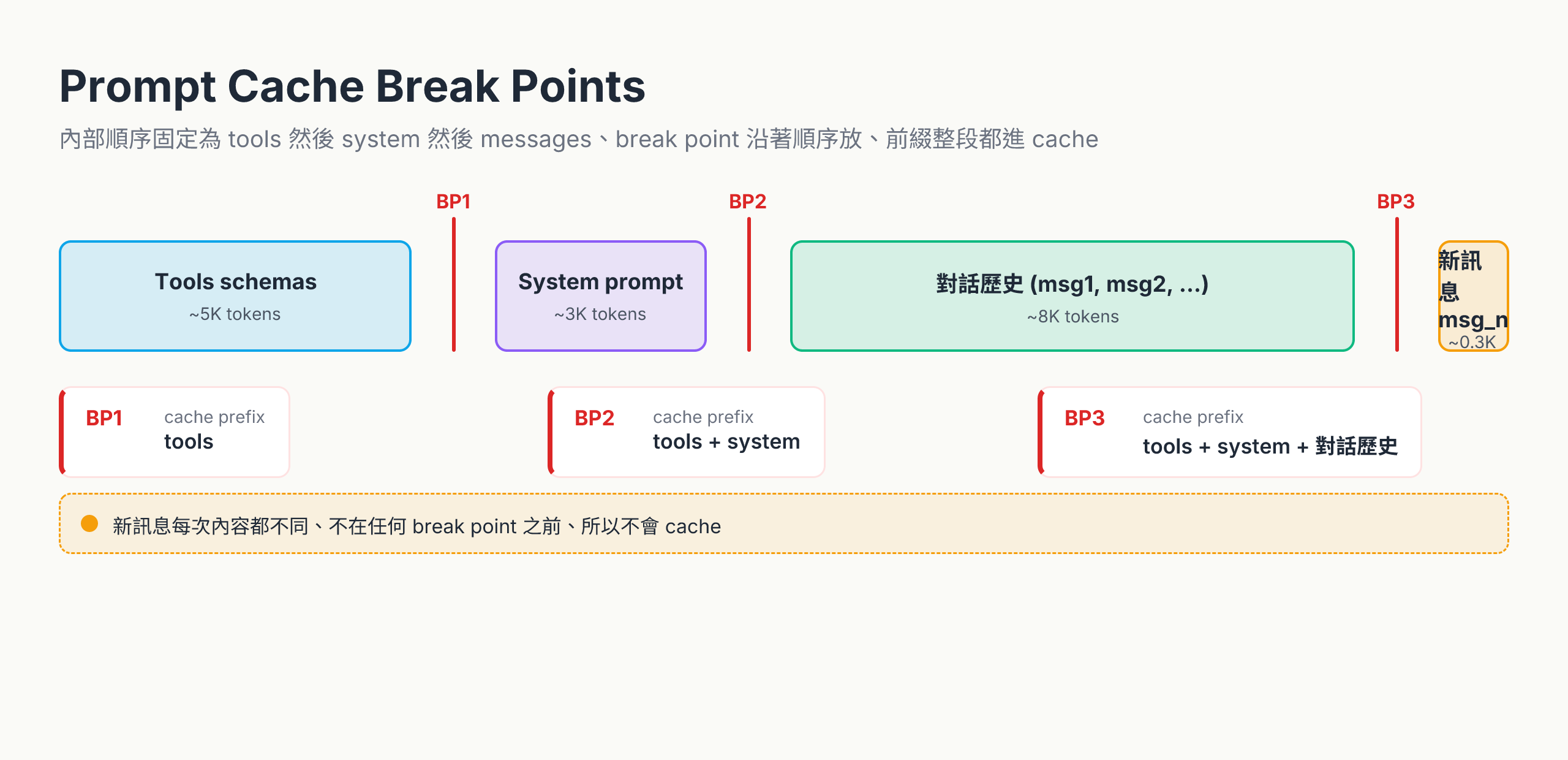
- BP1 蓋住 tool schemas(很少改)
- BP2 蓋住 tools + system(system 也很少改)
- BP3 蓋住 tools + system + 前段對話(這段的「前段」會逐步加長)
只要前面內容字面上 identical,每段都各自命中。改了哪段,後面所有 cache 全部失效,因為 cache 是「前綴匹配」。
Lookback:每個 breakpoint 只往回看 20 個 block
寫入時要前綴 identical 才命中——但 API 真正去比對的範圍是 breakpoint 往前數 20 個 content block。對話超過 20 個 block 後,更早的內容就算字面 identical 也認不出來。
對 multi-turn 影響特別大:累積到第 11 輪(user / assistant 交替已經 22 個 block)只放一個 breakpoint,前面內容就會落在窗外。解法是多放幾個 breakpoint——例如每 4-5 輪追加一個——讓窗口跟著對話往後滾。
命中規則:identical to the byte
cache_control 的命中極度敏感——多一個空格、字母大小寫不同、JSON key 順序變了都會 miss。
# 第一次
system = [{"type": "text", "text": "You are a helpful assistant.",
           "cache_control": {"type": "ephemeral"}}]
# → cache write

# 第二次:多一個 "please",整段 cache 失效
system = [{"type": "text", "text": "You are a helpful assistant. Please.",
           "cache_control": {"type": "ephemeral"}}]
# → cache miss,從頭再寫一次(被收 1.25× 寫入費)實作建議:把要 cache 的部分當常數,不要動態組字串塞進去。debug 變數放在 break point 之後。
還有哪些東西會讓 cache 失效
字面內容之外,request 層級的開關也會 invalidate 上游的 cache。production「prompt 沒改怎麼一直 miss」的真兇常常在這:
| 你改了什麼 | tools | system | messages |
|---|---|---|---|
| Tool 定義 | ✘ | ✘ | ✘ |
web_search / citations 開關 | ✓ | ✘ | ✘ |
| Fast mode(speed setting) | ✓ | ✘ | ✘ |
tool_choice | ✓ | ✓ | ✘ |
| Messages 裡 image 增減 | ✓ | ✓ | ✘ |
✓ 表示該層 cache 還活著、✘ 表示失效。模式很清楚:哪一層被動到,那層加下游全部一起沖掉。
所以監測 cache_read_input_tokens / cache_creation_input_tokens 的命中率比對 prompt 字串是不是 identical 重要——程式碼明明沒動但命中率掉了,通常是某個 request 多帶了一張 image、或某次調用切了 tool_choice。
最小可 cache 大小
太短的內容不會被 cache(避免 cache 抖動),門檻依模型版本不同:
| 模型 | 最小 cacheable tokens |
|---|---|
| Opus 4.7 / 4.6 / 4.5、Haiku 4.5 | 4096 |
| Sonnet 4.6、Haiku 3.5 | 2048 |
| Sonnet 4.5 / 4、Opus 4.1 / 4、Sonnet 3.7 | 1024 |
加總是「break point 以前的全部 token」,不是單個 block。例如用 Sonnet 4.6(門檻 2048)、system 800 tokens + tools 500 tokens = 1300 < 2048,標 cache_control 也不會生效——你不會被收寫入費,但也沒省到,而且 API 不會回錯誤。永遠用 cache_creation_input_tokens / cache_read_input_tokens 兩個欄位驗證。
TTL:5 分鐘 vs 1 小時
預設 cache 活 5 分鐘——這刻意設短,假設你是「user 連續問同一份文件」這類 burst 場景。
需要更長可以設 1 小時版(cache_control: {"type": "ephemeral", "ttl": "1h"},可用性視帳號等級)。1 小時版寫入費 2× base input(5 分鐘版 1.25×),讀取一樣 0.1×。適合「同一份 system prompt 服務一整個工作天」這種連續使用。
跟 multi-turn 的搭配
Multi-turn 那一篇 提過:API stateless,每輪都重傳整段歷史,token 線性成長。Prompt caching 就是這個問題的主要解藥:把舊對話 cache 起來,只付 0.1× 的讀取費,新一輪只算最新那段 user message。
# turn 5:把前 4 輪 cache 起來
messages = [
    {"role": "user", "content": [
        {"type": "text", "text": prior_turns_text,
         "cache_control": {"type": "ephemeral"}}
    ]},
    {"role": "assistant", "content": "..."},
    {"role": "user", "content": "新問題"},  # ← 這段不 cache
]
什麼時候不要 cache
| 場景 | 為什麼不適合 |
|---|---|
| 每次 input 內容都不一樣(一次性 prompt) | 永遠 miss,反而貴 25% |
| 內容 < 1024 tokens | 達不到最小門檻,標了沒用 |
| Burst 之間隔超過 1 小時 | 過期就失效,重寫一次又一次 |
| 內容含時間戳、user id 變動字段在前面 | 每次都不 identical |
接下來
下一篇看 extended thinking——讓 Claude 在生 visible response 之前先輸出一段 thinking block。Token 多但答案更穩,難題、debug、長 reasoning 用得到。